This is a small n8n project with two jobs on X (formerly Twitter). One watches the public conversation around a set of keywords and flags posts that are gaining engagement quickly. The other watches a single account’s own posts and replies to one with a call to action, a short reply ending in a tracked link, when it starts to take off. The keywords, the thresholds, and the reply templates live in a Google Sheet, so day-to-day changes never mean opening the workflow editor.
Two workflows
Both workflows run on a timer.
The first watches the public conversation. On each run it reads the keyword list from the sheet, searches recent posts, drops anything matching a block list of sensitive terms kept alongside the keywords, and ranks what is left by how fast it is gaining engagement. The top few go to a log tab in the sheet. It never comments on anything; the job is to surface posts, not act on them.
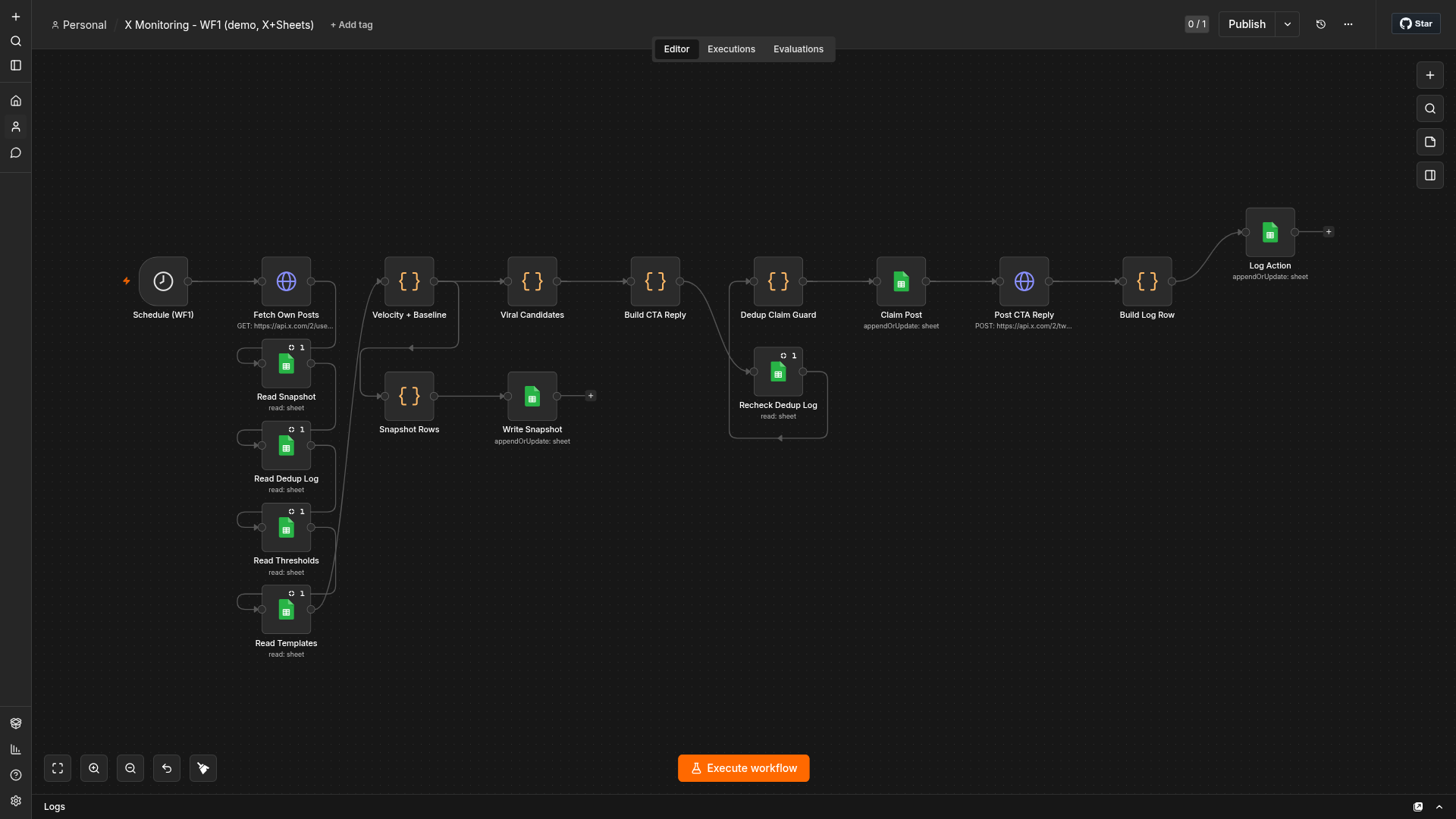
The second watches one account’s own posts, the one whose X credentials it holds. It pulls the recent ones, works out which are taking off relative to how that account normally performs, and posts a single reply to the strongest. The reply text comes from pre-approved templates in the sheet, so nothing goes out under the account’s name that a human has not already signed off. The timer interval is a sheet setting too.
Where it runs
The instance is self-hosted on a Kubernetes cluster at n8n.bayram.sh, reachable only through Cloudflare Access. None of that is needed to run the workflows; n8n Cloud or a single Docker container work the same.
Scoring by velocity
Both workflows rank by engagement velocity, not raw totals. Two hundred likes over a week is not a live opportunity; forty in the first half hour is.
For the topic search, each post gets a weighted engagement count. The weights are hand-picked, not derived: a reply or repost takes more effort than a like, so it counts for more.
engagement = likes + 2*replies + 3*reposts + quotes + bookmarksDividing by the post’s age in hours gives a velocity: engagement per hour since posting. Fresh posts then get a boost that fades to zero over a day, so two posts at the same velocity separate when one is twenty minutes old and the other twenty hours:
ageHours     = max(0.25, hours since posted)
velocity     = engagement / ageHours
recencyBoost = max(0, 1 - ageHours / 24)
score        = velocity * (1 + recencyBoost)
The fifteen-minute age floor keeps a brand-new post with three likes from reporting an absurd per-hour rate. Posts sort by score, anything below a configurable minimum drops off, and the top few stay.
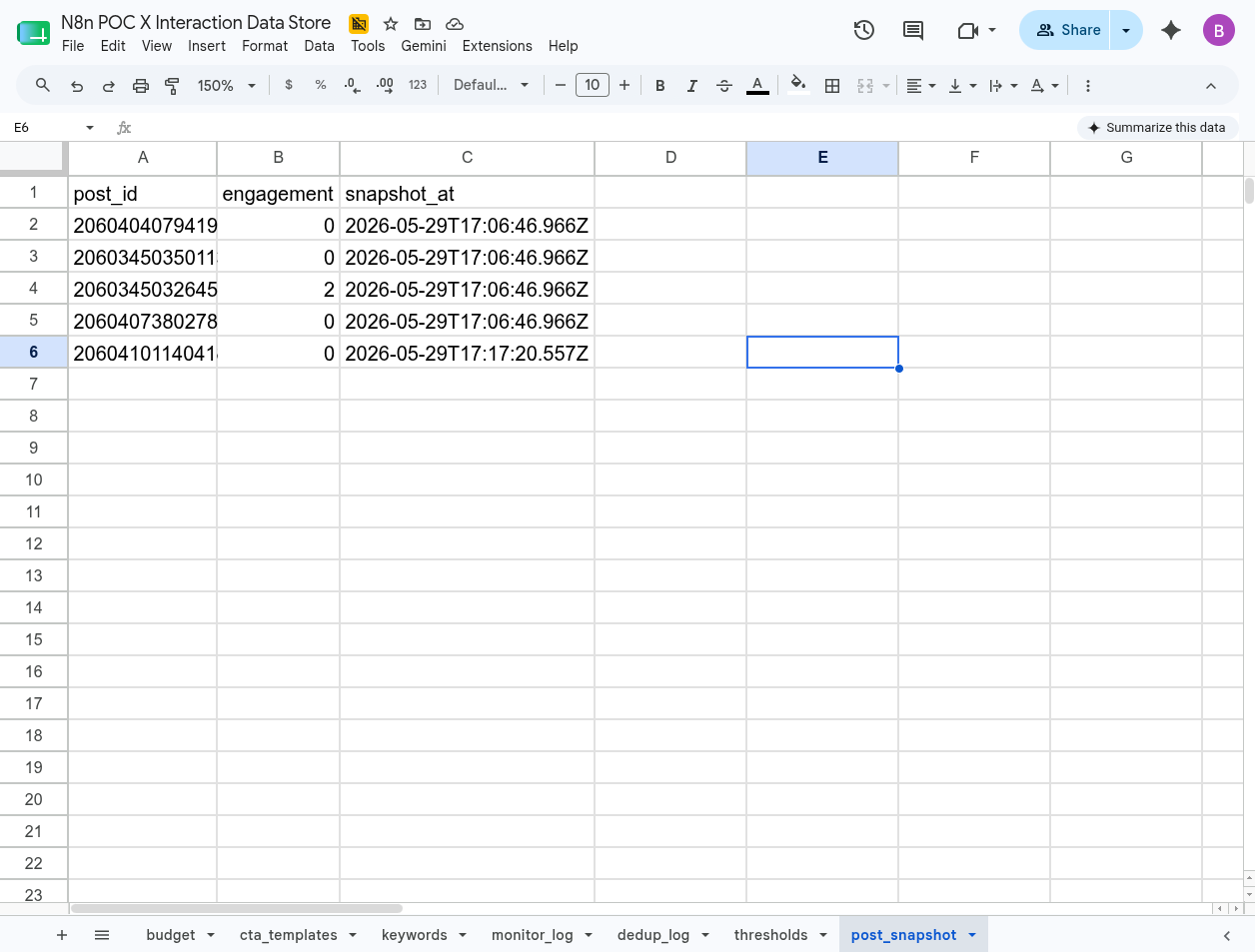
The own-post workflow needs a different measure, because whether a post is doing well only means something next to the account that posted it. Sixty likes in an hour is a spike for one account and an ordinary day for another. So it snapshots each post’s engagement on every run and measures velocity as the change since the last snapshot, the rate right now:
velocity = max(0, (engagement_now - engagement_last_run) / hours_between_runs)On the first sighting of a post there is no prior snapshot, so it falls back to engagement over total age. That is the cold start.
The spike threshold comes from a baseline: the median velocity across the account’s recent posts. A post counts as viral only when its current velocity is several times that baseline, its engagement clears a floor, and it is still young enough to be worth a reply. The multiple, the floor, and the maximum age are all sheet rows. The baseline carries a small floor of its own, so dividing by it does not blow up on a quiet account and flag everything.
When more than one post qualifies, only the strongest relative to baseline gets a reply: one call to action per run.
X API cost
X has no free API tier; reads and writes are billed per call. At the time of writing a search read is roughly half a cent and a write containing a link is around twenty cents. A five-minute timer searching a few keywords adds up over a month, and a reply step stuck in a retry loop is money, not a rate-limit warning.
So the topic workflow keeps a running tally of reads in the sheet and stops searching once it crosses a monthly cap. The cap is a config row, not a value buried in a node. When the budget is spent, the run logs the skip and exits.
Google Sheets as the store
A database could hold the config, the state, and the logs just as well. The reason this uses a Google Sheet is the interface. The person running it already knows spreadsheets, so editing a keyword, tuning the viral threshold, or rewriting a reply template is a cell edit in a grid they have used for years, not a query against a database or a custom admin panel.
One sheet holds everything, a tab per concern: keywords, thresholds, reply templates, the read budget, and two log tabs, one for the posts the topic workflow surfaces and one recording every reply sent. The same file also keeps what the workflows remember between runs, the engagement snapshots and the budget tally, on their own tabs.
n8n authenticates with a Google Cloud service account, which suits an unattended job: no consent screen, the workflow acts as the account. Create the account, download a key, and share the sheet with its email like sharing with a person.
Service account setup
Two Google Cloud settings get in the way when the account belongs to an organization, the default for Workspace.
The first is an org policy named iam.disableServiceAccountKeyCreation. While it is on, a service account key cannot be downloaded, and that key is what n8n needs. The policy is not changed in the project that holds the service account; it lives at the organization level, which means switching the console’s resource scope from the project to the organization at the top of the page.
The second is permission to change it at all, which needs the Organization Policy Administrator role, also granted at the organization scope. So the order is: switch scope to the organization, grant the role, turn off iam.disableServiceAccountKeyCreation, then drop back to the project and create the key.
One more step is easy to miss: two APIs have to be enabled on the project, not one. The Sheets API is the obvious one. The Drive API is the one that gets skipped, and without it the sheet calls fail with a permissions error that never mentions Drive.
The Code node sandbox
n8n’s Code node does not run plain Node.js. The JavaScript executes in a locked-down sandbox, and several expected globals are missing.
This surfaces when building a UTM-tagged link. URLSearchParams, the obvious way to assemble a query string, throws URLSearchParams is not defined inside the node. encodeURIComponent does exist, which is what makes the gap easy to miss. Building the string by hand works:
const qs = [
  'utm_source=x',
  'utm_medium=social',
  'utm_campaign=' + encodeURIComponent(campaign),
  'utm_content=' + encodeURIComponent(postId),
].join('&');
A unit test for this logic that runs outside n8n should not stub URLSearchParams to pass, or it hides the exact limitation that matters. The sandbox is the real environment, so the test belongs against its constraints.
The double-reply guard
The expensive failure is replying to the same post twice. Timers overlap, a run takes longer than expected, a retry fires, and the same call to action goes out twice at twenty cents each.
The guard is a check-then-write around the reply, with the reply log as the source of truth. The workflow reads that log immediately before posting; if the target post is already there, it stops. After a successful reply it writes the post id back. Doing the read right before the write, instead of once at the top of the run, is what stops two overlapping runs from both passing the check. It is the same move as a SELECT ... FOR UPDATE before a write: claim the row, then act.
It is not a distributed lock. For a workflow firing a handful of times an hour against one sheet, a read-immediately-before-write check is enough, and its behaviour is easy to follow from the log.
Most of the work here was not the X logic, which was straightforward. It was the parts around it: the Google Cloud org policies, and treating a duplicate write as the failure that actually costs money.